Why isn’t my LinkedIn bringing in clients? A ten-minute audit
By Christine Orchard, founder of Orchard Strategy |
I see founders spend months posting on LinkedIn without getting much business from it. They’re showing up consistently. Some posts do well. Their follower count is growing. But nobody’s asking about their services.
When I look at these accounts, I usually start with two questions: Are the posts accomplishing anything useful? And is any of that activity creating opportunities for the business?
Often, I find that nearly every post is trying to do the same thing: get more people to see it.
I’ve spent the past three years running LinkedIn content for founders and executives. One of the ways I plan content and evaluate what’s working is a framework I call the Four Post Jobs: Reach, Save, Reply, and Relationship.
To see how it held up in practice, I classified 257 posts across five accounts I run, from February to August 2026. I looked at the primary job each post appeared to be built for and how it performed against that account’s usual results.
Roughly a quarter didn’t produce a meaningful result for any of the four jobs.
You can learn quite a bit about your own LinkedIn strategy by looking at your last ten posts through the same lens. It should take about ten minutes.
What is the Four Post Jobs framework for LinkedIn?
The Four Post Jobs is a LinkedIn content planning and measurement framework I developed at Orchard Strategy. Every post gets one primary job: Reach, Save, Reply, or Relationship.
Each job has a different purpose, a different way to measure success, and a different way it can contribute to the business.
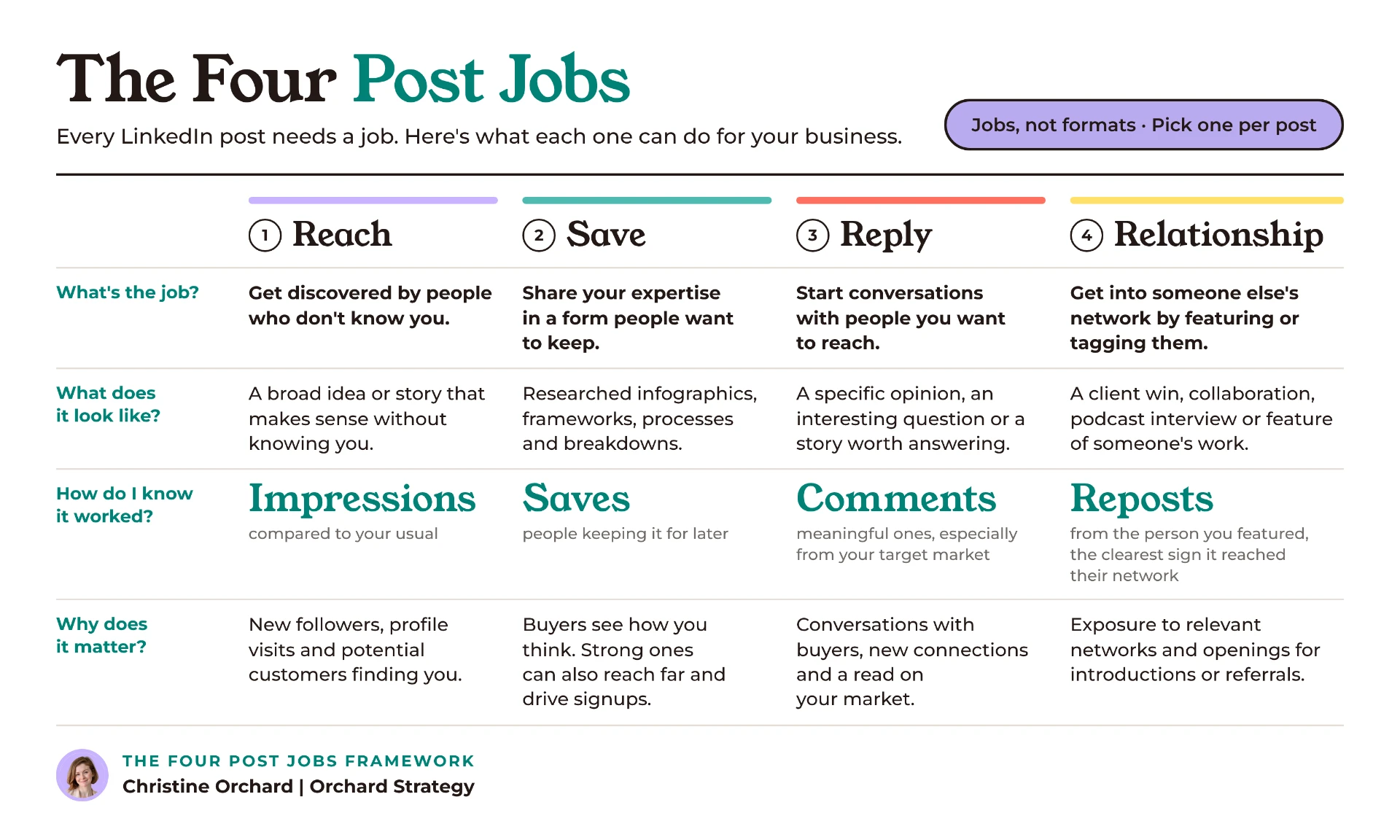
Reach: Get discovered by people who don’t know you. Measure impressions against your account’s usual performance. The business opportunity is getting potential customers to discover your ideas, visit your profile, or follow you.
Save: Share your research, process, or expertise in a form people want to keep. Measure saves. These posts demonstrate how you think, can generate substantial reach, and create opportunities for lead magnet downloads or signups.
Reply: Start conversations with people you want to reach. Look at meaningful comments, particularly from potential customers. The business opportunity comes from direct interactions, new connections, and learning what your market cares about.
Relationship: Get your content into someone else’s network by featuring or tagging them. Look at reposts and meaningful comments from the featured person. This can introduce you to relevant audiences and create opportunities for collaborations, introductions, and referrals.
A post can accomplish more than one job. Some of our best Save posts have also generated enormous reach. I still choose a primary job before creating a post because it affects the angle, format, and how much detail to include. When I review performance, I look at everything the post accomplished, including results outside its primary job.
The jobs also aren’t content categories. A meme could be built for Reach. A founder story might invite Reply. An infographic could be designed for Save, or it could feature someone whose network you’re hoping to reach.
The job is about what you’re trying to accomplish.
How does each job help you get clients?
You can have a post that performs brilliantly by LinkedIn’s standards and does very little for your business. So when I’m planning content, I look at both what the post should accomplish on LinkedIn and what opportunity that creates for the business.
Reach: Get discovered by people who might eventually buy from you
A Reach post is often someone’s first encounter with you. They see an interesting idea, stop scrolling, and maybe click your name. Some will follow you. Others might visit your website or a resource you’ve linked.
This is why I care about what happens after someone discovers you. If they click your profile, can they tell what you do? Is there evidence you’ve helped people like them? Is there a reason to follow you or get in touch?
You might also include a relevant next step directly in the post, such as a newsletter or free resource.
I wouldn’t judge every Reach post by how many leads it generates. Its immediate job is discovery. But if you’re consistently reaching new people and none of that attention seems to go anywhere, I’d look at who you’re attracting and what they find when they get interested.
And I’d always judge impressions against your own account.
20,000 impressions is a triumph on one account and a quiet Tuesday on another.
Save: Show people how you think and give them something worth keeping
Some of my most valuable LinkedIn posts are the ones that get saved. These tend to be closer to the actual work my clients do. A researched infographic, a framework they’ve developed, or a breakdown of how they approach a difficult problem.
Someone saves it because it’s relevant to something they’re dealing with, or something they expect to face.
I particularly like Save for people who sell expertise because you’re giving potential customers a small piece of the thinking they’d be paying you for.
A consultant might share the questions they use to diagnose a problem. A founder might explain how their team makes a difficult decision. A leadership advisor might turn their workshop process into a checklist.
These posts can also travel surprisingly far. I’ve seen researched infographics generate substantial reach alongside thousands of saves. I wouldn’t assume saves alone caused that distribution, but the two can go together.
And when there’s a relevant next step, you can connect that interest to lead generation. An infographic might link to a free course, a more detailed guide, or another resource that helps someone go further.
Reply: Create conversations you wouldn’t otherwise have
I’m more interested in whether a post gives people I want to reach something worth responding to than in how many comments it gets.
Maybe you share an opinion about something changing in your industry. Or explain why you disagree with a common approach to a problem.
When someone responds thoughtfully, you have an opportunity to interact directly. You can ask a follow-up question, learn about their situation, or contribute something specific to what they’ve shared.
That interaction can help a potential customer get a feel for how you think. It can also tell you what people in your market are struggling with, which is useful when deciding what to write about next.
Sometimes those exchanges lead to new connections, further conversations, or inquiries.
I’d rather have five thoughtful comments from people in my target market than fifty generic responses from people who will never buy from me.
Relationship: Reach new networks through people who already know you
A Relationship post features or tags someone with a genuine reason to engage. Maybe you’re sharing a client’s achievement, a collaboration, or something interesting you learned from someone in your industry.
If that person reposts, your content can reach people in their network. A meaningful comment may also help with visibility, although it doesn’t guarantee their network will see the post.
This is one reason I share episodes of my podcast, Marketers Do Coffee, on LinkedIn. I feature the guest, share something interesting from our conversation, and give them a reason to comment or repost.
Their network might discover me through that interaction. And staying connected with interesting people creates opportunities for introductions, collaborations, and referrals.
The key is creating something the featured person would genuinely want to share. Tagging people for the sake of tagging them rarely accomplishes much.
How do I audit my LinkedIn in ten minutes?
Open your last ten posts. Use the last ten, even if they aren’t your best.
For each post, answer four questions.
What job was this post built for?
Assign it Reach, Save, Reply, or Relationship. If you can’t remember what you intended, look at how the post was written and what it appears to be trying to accomplish.
Don’t assign it a job just because one metric happened to perform well. If you genuinely can’t tell, mark it Unclear.
Did it accomplish that job?
Look at the relevant metric. For Reach, compare impressions with your usual performance. For Save, look at saves. For Reply, look at the comments and who left them. For Relationship, check whether the person you featured reposted or commented.
Also pay attention to secondary results. A Save post might have generated excellent reach, even if that wasn’t its primary job.
Did that result create an opportunity for the business?
This is the question I’d spend the most time on.
For a Reach post, did you attract people who might be interested in what you sell? If someone clicked your profile, would they understand your services?
For Save, was the content connected to your actual expertise? Was there a relevant next step for someone who wanted more?
For Reply, were people you want to work with participating? Did you respond and continue the conversation?
For Relationship, was the featured person’s network relevant to your business? Could that connection lead to introductions or referrals?
You won’t always be able to track the business impact of an individual post. That’s fine. You’re looking for whether there’s a reasonable connection between what you’re publishing and what you want your business to accomplish.
What would you change next time?
Be specific. Maybe the Reach post attracted the wrong audience. Maybe the infographic was too generic to save. Maybe your opinion didn’t give anyone a reason to respond.
Example: A five-step infographic about difficult customer conversations
Intended job: Save
Result: Two saves, well below similar posts on the account.
Business connection: Relevant to the service, but too generic to demonstrate much expertise.
What I’d change: Turn it into a checklist someone could use before an actual conversation, based on the process I use with clients.
Once you’ve reviewed all ten posts, count how many fall into each job and how many worked. Then look at the business connections.
You should start to see where things are breaking down.
What do my audit results mean?
There are three patterns I’d look for.
1. You’re doing the same job over and over
Let’s say seven of your ten posts were built for Reach. You’re spending most of your effort trying to get discovered. That might make sense if you’re building an audience from scratch.
But if you’ve been posting for a year and wondering why people don’t seem to understand what you’re good at, I’d look at whether you’re creating enough content that demonstrates your expertise.
Save is particularly useful here. A researched infographic or practical framework gives someone a chance to see how you approach the problems they’d hire you to solve.
Reply is another job I often see overlooked.
I recently looked at a separate fifty-post plan across five accounts. Exactly one post had been designed to get comments. One out of fifty.
There were plenty of useful posts and interesting observations, but very few created an opportunity for an actual conversation.
And if you regularly work with interesting clients, collaborators, or people in your industry, you may be overlooking Relationship opportunities too.
I wouldn’t force an equal number of each job into your calendar. I’d look at what the business needs and where the current content is falling short.
2. You’re choosing the right jobs, but the posts aren’t working
Maybe you’ve created three Save posts and none earned meaningful saves. Or you’ve published several opinions hoping to start conversations, but nobody responded.
Now I’d look at the execution.
For Save, is the content specific enough to be worth keeping? Does it contain original research, a useful process, or thinking someone couldn’t easily get from a generic AI-generated list?
For Reply, have you given people something they genuinely have an opinion about?
For Reach, would someone who doesn’t know you understand why the idea matters?
For Relationship, would the person you featured actually want to comment or share it?
Across the 257 posts I analyzed, roughly a quarter didn’t produce a meaningful result for any of the four jobs.
I evaluated posts against their own account’s usual performance, using the metrics relevant to each job. For Reply and Relationship, I also considered who engaged and the nature of their responses.
There’s judgment involved in that analysis, especially when evaluating comments. I wouldn’t treat the result as a universal benchmark. But it showed how many posts weren’t accomplishing what we’d hoped they would.
3. Your posts are working, but they’re leading nowhere useful
This is the one I’d pay closest attention to if you’re trying to get clients.
Maybe you’re getting good reach, meaningful comments, and plenty of saves. But are you attracting potential customers? Are they learning anything about what you do?
And when someone becomes interested enough to click your name, what happens next?
Can they tell who you help? Is there evidence of your work? Can they find a relevant resource or get in touch?
You might have a strong content strategy and a weak profile. Or a great audience but very little content that connects your expertise to what you sell.
Sometimes the problem is that your posts don’t have a clear job. Other times, the posts are doing exactly what you designed them to do. You just haven’t thought through what should happen next.
What does this look like when LinkedIn actually brings in customers?
One of my favorite examples comes from Facilitator School.
The founder teaches managers and facilitators how to run better meetings and workshops. When we started working together, nearly everyone buying his Masterclass was finding it through Google.
We wanted LinkedIn to become another source of customers.
He already had excellent teaching material. My job was to find the ideas that would work on LinkedIn and turn them into content people could use.
We created 21 infographics as part of a 49-post LinkedIn program over four and a half months. The infographics covered practical facilitation methods, with tagged links directing interested readers to his free course.
Facilitator School: 4.5 months on LinkedIn
4,631 saves · 301 email signups · 5 paying customers
Results from the full 49-post program. Signups and customers were traced back to LinkedIn.
The highest-reach post was seen by 82,576 people and brought in 20 signups. Other posts reached far fewer people but also contributed signups.
If we’d only looked at impressions, we would have missed a lot of what was happening.
The infographics demonstrated the founder’s expertise and gave people something useful to keep. The free course gave interested readers somewhere to go. And the Masterclass was there when they wanted to learn more.
That’s the connection I want to see between LinkedIn content and the business behind it.
Read the full Facilitator School case study
What should I change about my LinkedIn content next month?
Start with what your audit tells you.
If you’re doing too much Reach and not enough Save, look at the work you’re already doing. What frameworks, processes, or research could you share that would help potential customers understand your expertise?
If you’re getting little meaningful engagement, experiment with posts that invite people to contribute their own experiences or opinions.
If you have interesting clients, collaborators, or industry connections, think about whether there’s an opportunity to feature their work.
And if your posts are performing but nobody’s getting in touch, look at what happens after someone becomes interested.
Your LinkedIn profile should explain what you do and who you help. Your content should give people reasons to trust your expertise. And there should be an obvious next step when someone wants more.
I generally recommend starting with two or three posts a week and being deliberate about what each one is supposed to accomplish. Then review the results and adjust.
Common questions about the Four Post Jobs
Can one LinkedIn post do more than one job?
Absolutely. Some of our best Save posts have also generated enormous reach. A Relationship post might start an interesting conversation. A Reach post could bring in leads directly.
I still choose one primary job when planning because it helps me make decisions about the angle, format, and content. When evaluating results, I look at everything the post accomplished.
What if my posts get lots of engagement but no clients?
I’d look at who is engaging and what happens afterward.
Are the people responding potential customers, or mostly peers? Does your content help them understand your expertise and what you offer? And if someone visits your profile, can they easily find out how to work with you?
Strong engagement can be useful, but it doesn’t tell you whether your content is contributing to the business.
Should I use all four jobs every month?
I wouldn’t force it. The right mix depends on what you’re trying to accomplish.
If you’re entering a new market, Reach might be the priority. If you already have an audience but people don’t understand your expertise, I’d invest more in Save.
I’d rather see a few posts with a clear purpose than a calendar that checks every box without much thought behind it.
Found the problem. Don’t want to run the whole system yourself?
The audit should take about ten minutes. Fixing what you find takes more work.
Someone needs to decide which ideas are worth developing, what each post should accomplish, how to present it, and whether it’s reaching the right people. Then there’s the research, writing, design, publishing, and figuring out what to change based on the results.
That’s the work I do at Orchard Strategy. I work directly with B2B founders, executives, and consultants to turn their expertise into LinkedIn content that supports their business, and I run the system from strategy through execution.
Engagements start at $5,000/month.
If you’re ready to make LinkedIn a more useful part of how your business grows, let’s talk.